Modernising legacy software without disrupting your business
Old systems often run the most important parts of a business. The goal is to replace them without anyone noticing the engine was changed mid-flight.
Legacy software is rarely bad software. It is usually software that did its job so well, for so long, that the business grew around it. The trouble starts when it becomes hard to change, expensive to run and risky to keep. Yet replacing it feels even riskier, because it quietly holds years of business rules that nobody fully remembers.
The answer is neither to live with it forever nor to replace it in one dramatic weekend. It is to modernise in planned, reversible steps while the business keeps running. Here is a practical approach.
When modernisation becomes urgent
Age alone isn't a reason to modernise. These signs are:
- The platform, language version or database is no longer supported, so security fixes have stopped.
- Only one or two people understand how the system works.
- Simple changes take weeks because every change risks breaking something else.
- The system can't connect to newer tools because it has no usable APIs.
- Hosting, licence or hardware costs keep rising.
- It can't scale to the volume the business now needs.
- Customers or auditors ask security and data-handling questions the system can't answer.
Step 1: Assess before you act
A good assessment saves months later. Map what the system does today: its main functions, who uses each one, which other systems it exchanges data with, and how critical each part is to daily operations. Look at the code and infrastructure honestly — test coverage, documentation, deployment process and known weak spots.
Above all, capture the business rules hidden in the code. Pricing exceptions, tax calculations and approval paths are often documented nowhere else. Sitting with experienced users while they work, and reading the code with the developers who maintain it, will surface rules that a requirements workshop would miss.
The assessment usually reveals quick wins as well: automating a manual deployment, adding monitoring, or upgrading an unsupported component. Doing these early reduces risk immediately and builds confidence for the larger work ahead.
Step 2: Choose the right approach
There is no single modernisation strategy. Different parts of the same system often deserve different treatment:
| Approach | What it means | When it fits |
|---|---|---|
| Retain | Keep it as it is for now | Stable, low-risk parts with little change ahead |
| Rehost | Move to new infrastructure, such as the cloud, with minimal code change | Ageing hardware or data-centre exits; a fast first step |
| Replatform | Upgrade the runtime, database or framework while keeping the design | Unsupported platforms with sound business logic |
| Refactor | Restructure the code to make it easier to change | Valuable logic trapped in hard-to-maintain code |
| Rebuild | Rewrite a capability with a modern architecture | Core, differentiating functions that need to evolve quickly |
| Replace | Switch to an off-the-shelf or SaaS product | Commodity functions such as payroll, email or basic accounting |
In practice, most programmes combine several approaches: rehosting first to escape failing hardware, replacing commodity modules with SaaS products, and rebuilding only the few capabilities that set the business apart.
Step 3: Migrate in small, reversible steps
For systems that are central to the business, the safest route is usually the strangler fig pattern, named after a plant that slowly grows around a tree until it can stand on its own. You place a routing layer, such as an API gateway, in front of the old system. Users and other applications talk to the routing layer, which initially passes everything to the legacy application. You then build new services one capability at a time and redirect the relevant traffic to them.
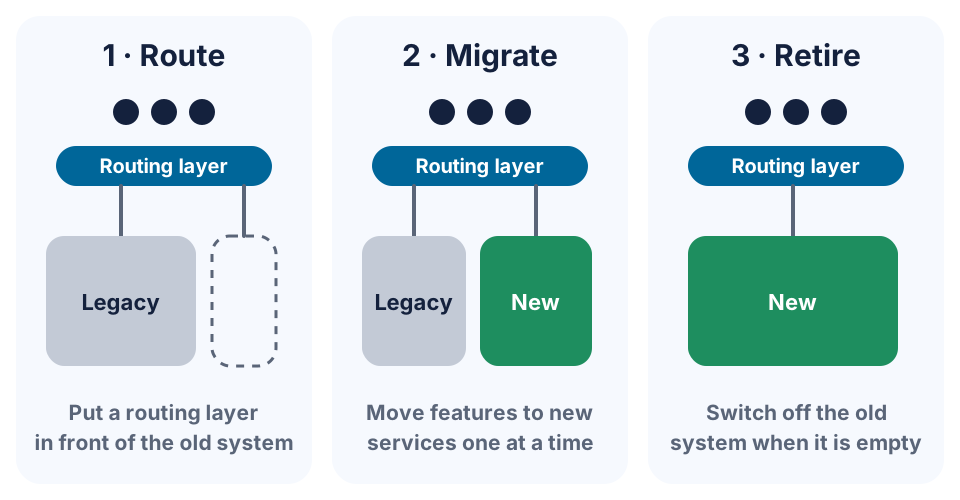
Each step is small enough to test thoroughly and, crucially, reversible: if a new service misbehaves, the routing layer can send traffic back to the old system while you fix it. Keep each step small enough to finish in weeks rather than months. Start with a capability that is valuable but not the most critical, so the team learns the process on something forgiving.
Step 4: Treat data as its own project
Data migration is where many modernisation projects stumble. Years of records contain duplicates, inconsistent formats and fields used for purposes nobody remembers. Plan the data work separately: profile and clean the data, map old structures to new ones, and reconcile results with business users — totals, balances and record counts must match. During the transition, old and new systems may need to stay in sync, so decide early which system is the source of truth for each type of data. Not everything has to move, either: older records that are rarely used can be archived in a searchable, read-only store instead of being migrated.
Step 5: Protect daily operations
- Capture current behaviour before changing it. Automated checks that record what the old system does today make it obvious when the new one differs.
- Run old and new in parallel for critical calculations and compare the results before switching over.
- Use feature flags to release changes to a small group of users first.
- Schedule cut-overs outside peak periods, such as month-end or seasonal rushes, with a rehearsed rollback plan.
- Tell users what is changing and when, and train them before go-live, not after.
Don't forget the people
The developers and users who know the old system are your most valuable asset in a modernisation. Pair them with the team building the new services, so their knowledge of edge cases and business rules carries across. Recognise their contribution, too: people who feel their system is being “thrown away” can understandably resist the change.
Plan for the weeks after each go-live as well. Extra support on hand, a quick way for users to report problems and visible fixes to early issues build the trust that the next migration step depends on.
Measure progress in business terms
Lines of code migrated is not a useful measure. Track what the business cares about:
- how long it takes to deliver a typical change, from request to production;
- the number of incidents and how long they take to resolve;
- hosting, licence and support costs;
- the share of transactions handled by new services;
- the satisfaction of the people who use the system every day.
Common pitfalls
- Rewriting before understanding. Skipping the assessment means rediscovering business rules in production.
- Modernising everything at once. Too many parallel streams make problems hard to trace and progress hard to see.
- Freezing the old system too early. The business will still need changes during the programme, so plan for maintaining both systems for a while.
- Underestimating integrations. Files, reports and scripts that other teams rely on are easy to miss until they break.
An illustrative example
Consider a mid-sized distributor running a fifteen-year-old desktop order-management system. Rather than a complete rewrite, the team first rehosted the application on cloud infrastructure to retire failing hardware. Next, they placed an API layer in front of it and built a customer web portal on top, giving clients self-service order tracking without touching the core. Invoicing was rebuilt as a new service, run in parallel for two billing cycles and then switched over. Inventory followed. When the old system no longer handled any live traffic, it was archived for reference and switched off — with no weekend-long cut-over, and benefits delivered at every stage.
Modernise steadily, not dramatically
Successful modernisation looks almost boring from the outside: small, well-tested steps, each one delivering value and none of them putting the business at risk. Start with the assessment, choose one capability and prove the approach. Build it into your technology roadmap so it competes fairly with new work, and if you need experienced hands, see our software development services.
Frequently asked questions
Should we rewrite our legacy system from scratch?
Rarely in one go. Full rewrites usually take longer than planned and must reproduce years of undocumented business rules before delivering any value. An incremental approach delivers benefits sooner and lets you change direction safely.
How long does legacy modernisation take?
It depends on the size of the system and the approach. Rehosting can take weeks, while incrementally rebuilding a core system often runs for twelve to twenty-four months. With an incremental approach, benefits arrive along the way rather than only at the end.
What is the strangler fig pattern?
It's a way of replacing a system gradually. A routing layer sits in front of the old application, and features are moved to new services one at a time until the old system handles nothing and can be switched off.
Can we keep using the legacy system while we modernise?
Yes — with an incremental approach that is the norm. The old system keeps running and serving users while capabilities move across, and it is only retired once nothing depends on it any more.
Is moving to the cloud the same as modernising?
Not on its own. Moving an application to the cloud unchanged can cut infrastructure costs and retire old hardware, but the software is just as hard to change as before. It is often a sensible first step, followed by deeper work on the parts that matter most.