Web app or mobile app? How to decide
The right answer depends less on technology and more on who your users are, what they need to do and how often they'll do it.

“Should we build a website or an app?” is one of the first questions in almost every new digital product, and getting it wrong is expensive. Build a native app that people only need twice a year and few will install it; build a website for field staff who work without a signal and they'll go back to paper. The good news is that a handful of questions about your users settles most decisions.
Know the options: it isn't a binary choice
“Web or mobile” is really a spectrum, and each step trades reach and cost for deeper access to the device:
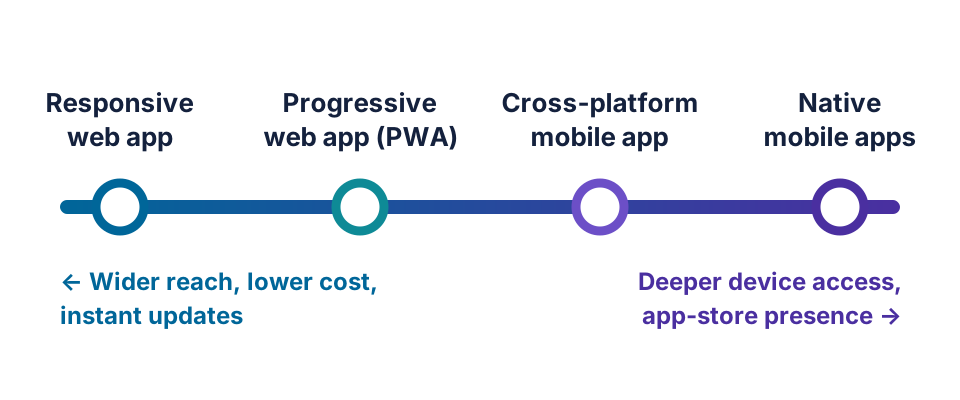
- Responsive web app — runs in any browser and adapts to every screen size. Nothing to install.
- Progressive web app (PWA) — a web app that can be added to the home screen, work offline and send notifications.
- Cross-platform mobile app — one codebase, built with frameworks such as Flutter or React Native, published to both app stores.
- Native apps — separate iOS and Android apps built with each platform's own tools, offering the best performance and full hardware access.
Many successful products combine them: a web app for administrators and office staff, and a mobile app for people in the field, both running on the same back end.
Five questions that settle most decisions
Where do your users start their task?
People managing accounts, reports or approvals at a desk are well served by the web. People capturing information on the move — delivery drivers, sales representatives, technicians — are better served by something built for the phone in their hand.
How often will they use it?
Daily habits justify a home-screen icon; occasional tasks don't. Few customers will download an app to pay one invoice a quarter, but they will happily open a link.
Do you need deep device features?
Camera access, location and notifications are now available to web apps on most platforms. Continuous background location, Bluetooth hardware, NFC or demanding graphics still point towards native or cross-platform apps.
Must it work offline?
If users regularly work in basements, warehouses or rural areas, offline capability is essential. PWAs can handle simple offline use; complex offline data with conflict resolution is usually easier in a mobile app.
How quickly do you need to ship and change?
Web updates reach every user the moment you deploy. Mobile updates pass through app-store review and depend on users installing them, so fixes and experiments take longer to land.
Quick comparison
| Factor | Web app (incl. PWA) | Mobile app |
|---|---|---|
| Reach | Any device with a browser, found through search | Users who find and install it from an app store |
| Build cost | Lower — one codebase | Higher, especially for two native apps |
| Updates | Instant for everyone | Store review, then user installs |
| Device features | Good and improving | Full access |
| Offline use | Basic to moderate | Strong |
| Engagement | Relies on links, email and bookmarks | Home-screen presence and rich notifications |
What about budget?
A web app is usually the most economical place to start: one codebase, one release process and no store fees. Cross-platform frameworks have made mobile far more affordable than building two native apps, but every mobile app still carries ongoing costs — operating-system updates, device testing and store compliance. A practical pattern is to launch on the web, learn how people actually use the product, and add a mobile app when usage data justifies it. The exception is a product whose core value depends on the phone itself, such as scanning, navigation or on-site data capture.
Three quick examples
- A client reporting portal used weekly from the office: a responsive web app.
- A field-service tool for technicians who photograph equipment and work without a signal: a cross-platform mobile app with offline sync.
- A customer loyalty programme: start with a PWA to test demand, then invest in native apps if engagement grows.
- An internal approvals tool for managers: a responsive web app with email and push notifications — no app store needed.
Mistakes to avoid
- Building everything at once. Launching on web, iOS and Android before you know what users value triples the cost of every lesson.
- Copying the website into an app. An app earns its place on the home screen by doing a few frequent tasks faster, not by repeating every page.
- Designing only for fast phones and good networks. Test on mid-range devices and slow connections, and build in accessibility from the start.
- Forgetting the running costs. Budget for operating-system updates, security fixes and store compliance every year, not just the first release.
Decide by user, then by technology
Start with the people who will use the product and the moments they'll use it in; the technology choice usually follows. Whichever you choose, design the back end around a clean API so the decision isn't permanent. If you're also replacing an older system, our guide to modernising legacy software may help. To talk through your own case, see our web and mobile development services.
Frequently asked questions
Is a progressive web app a good alternative to a mobile app?
For many business uses, yes. A progressive web app (PWA) can be installed to the home screen, work offline and send notifications on most modern platforms. It's less suited to apps that need deep hardware access, heavy graphics or an app-store presence.
Is it cheaper to build a web app or a mobile app?
A web app is usually cheaper to build and maintain, because there is a single codebase and no app-store releases. Cross-platform frameworks narrow the gap for mobile, while separate native iOS and Android apps typically cost the most.
Can we start with a web app and add a mobile app later?
Yes, and it's often the smartest path. If the back end is built around a clean API, a mobile app can later reuse the same services, data and business rules.
Should we build for iOS or Android first?
Let your users decide. Your website analytics show which devices your audience already uses, and the split varies widely by market and customer type. If the answer is both, a cross-platform framework lets you launch on each without building twice.