
Why managed IT services save more than money
The monthly fee is the easy part to compare. The real value shows up in hours, risk and focus that never appear on an invoice.
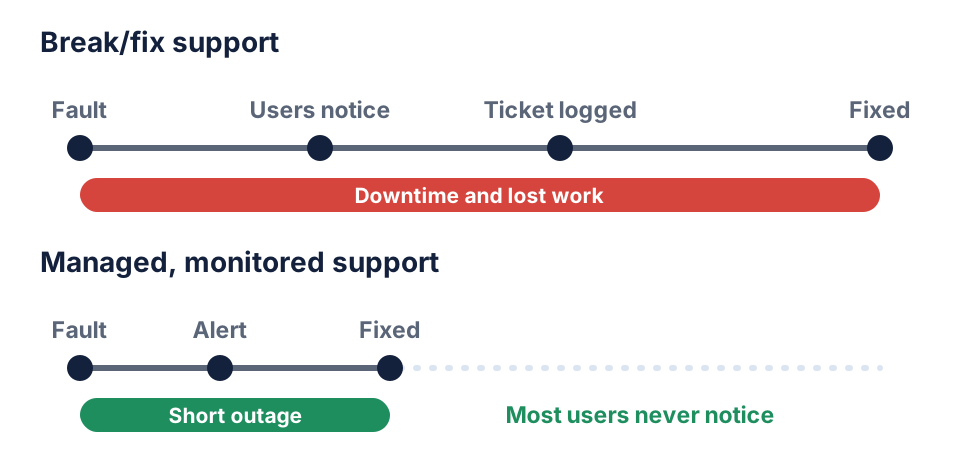
Many businesses still run IT on a break/fix basis: something stops working, someone calls for help and a technician fixes it — for a fee. Managed IT services turn that around. A provider monitors and maintains your systems continuously for a fixed monthly fee, with agreed response times. The cost comparison is easy to make, but the bigger benefits rarely show up on an invoice.
1. You get time back
In smaller companies, IT often lands on whoever is “good with computers” — an office manager, a developer or even a director. Every password reset, printer problem and laptop set-up interrupts their real job. Handing routine support to a dedicated help desk returns those hours to the work you actually hired people to do. New starters get a laptop that is ready on their first morning, not their first week.
2. Problems are caught before users notice
Break/fix support starts only after someone notices a problem, which is usually when work has already stopped. Managed services watch servers, networks and devices around the clock, so a full disk, a failing drive or an expiring certificate raises an alert long before it becomes an outage.
3. Security stops being an afterthought
Most successful attacks exploit basics: unpatched software, reused passwords and backups that were never tested. A managed provider makes those basics routine — scheduled patching, multi-factor authentication, endpoint protection, regular access reviews and backups that are restored in tests, not just taken. When something does go wrong, a tested recovery plan is the difference between an inconvenient morning and a lost week. Routine records of patching, access and backups also make customer security questionnaires and audits far easier to answer.
4. Costs become predictable
Break/fix spending is lumpy: quiet months followed by an expensive emergency. A fixed monthly fee makes IT a planned operating cost. Good providers also plan hardware and licence renewals ahead, so replacements happen on schedule rather than when a laptop dies the day before a client presentation. The model also aligns incentives: a provider paid a fixed fee benefits from preventing problems, not from fixing them.
5. You get a team, not a single person
Even an excellent in-house IT person can't be an expert in networking, cloud, security and end-user support at once — and they take holidays. A managed service gives you access to a team with broader skills and documented knowledge, so support doesn't stop when one person is away.
It doesn't have to replace your IT team
Managed IT isn't all-or-nothing. Many organisations with an internal IT person or team choose a co-managed model: the provider takes on monitoring, patching, backups and first-line support, while the in-house team focuses on projects, business applications and the knowledge only an insider has. Your people stop being the help desk and start being the experts the business relies on.
How to measure the value
Agree a few measures at the start and review them every quarter:
- the number of incidents, and how many were caught by monitoring rather than reported by users;
- average time to respond and to resolve, against the agreed service levels;
- the share of devices fully patched, and the results of backup restore tests;
- user satisfaction with support, and hours your own staff still spend on IT issues.
What to check in a managed IT agreement
- Response and resolution times for each priority level — and how they are measured.
- What's included and what isn't: on-site visits, new-user set-up, cloud services, out-of-hours support.
- Reporting: regular summaries of incidents, patch status and risks.
- Documentation and exit terms: you should own the passwords, configuration records and documentation if you ever change provider.
For a broader checklist, see what to look for in a technology partner.
The real return is focus
Lower and steadier costs are welcome, but the lasting value of managed IT is a business that runs without constant interruptions, and a team that spends its time on growth rather than firefighting. Learn more about our managed IT services.
Frequently asked questions
What is included in managed IT services?
Typically round-the-clock monitoring, help-desk support, patching and updates, backup management, security tools and regular reporting. Cloud management, network support and hardware lifecycle planning are often included or available as add-ons — always confirm the scope in writing.
Are managed IT services worth it for a small business?
Usually, yes. Small teams feel the impact of downtime and security incidents the most, and rarely employ specialist IT staff. A managed provider gives you that expertise for a predictable monthly fee.
How are managed IT services usually priced?
Most providers charge a fixed monthly fee per user or per device, often in tiers that add services such as advanced security or out-of-hours support. Projects like office moves or major upgrades are usually quoted separately.